# Anvi’o pangenomic analyzes using pWCP, WO, *w*PipSLAB and *w*PipPel including addition of metagenomic data layers
January 7, 2026
*Maxime Mahout*
- Notebook
for creation and annotation of an anvi'o pangenome
- Contigs database creation
- Pangenome
creation
- Display pangenome and
remove outliers
- Mapping SLAB and Isolate on
SLAB assembly
- Preparing coverage for the
pangenome
- Anvio
commands for preparing Python notebook analysis
- Export
items data for getting number of genome hits in particular
- Get the
GFF of *w*PipSLAB for gene coverage calculation
-
- Adding coverage to the
pangenome
- Splitting
pangenome to remove outliers and display split pangenome
- Or, if we want
to simply show the full pangenome
Language: Bash
## Contigs database creation
``` bash
anvi-script-reformat-fasta final-Wolbachia-contigs.fa --simplify-names -o formatted-Wolbachia-contigs.fa
```
``` bash
anvi-gen-contigs-database -f formatted-Wolbachia-contigs.fa -o Isolate1-contigs.db
```
``` bash
anvi-get-sequences-for-gene-calls -c Isolate1-contigs.db --export-gff3 -o Isolate1-genes.gff
```
``` bash
anvi-get-sequences-for-gene-calls -c Isolate1-contigs.db --get-aa-sequences -o PROTEINS.fa
```
## Pangenome creation
``` bash
cat Data/external_genomes_latest.csv
```
## name contigs_db_path
## WOPip1 ../Phages/WOPip1-contigs.db
## WOPip2 ../Phages/WOPip2-contigs.db
## WOPip3 ../Phages/WOPip3-contigs.db
## WOPip4 ../Phages/WOPip4-contigs.db
## WOPip5 ../Phages/WOPip5-contigs.db
## wPipPel ../PipRef/wPipPel-contigs.db
## pWCP ../PipRef/pWCP-contigs.db
## wPipSLAB ./wSLAB002o-contigs.db
## Isolate1 ./Isolate1-contigs.db
``` bash
anvi-gen-genomes-storage -e external_genomes_latest.csv -o ISOLATE-GENOMES.db
```
``` bash
anvi-pan-genome --mcl-inflation 10 --use-ncbi-blast -g ISOLATE-GENOMES.db -n ISOLATE_PAN -T 4
```
## Display pangenome and remove outliers
We display the generated pangenome using the following command:
``` bash
anvi-display-pan -p ISOLATE_PAN/ISOLATE_PAN-PAN.db -g ISOLATE-GENOMES.db
```
The resulting pangenome contains 1143 GCs (Gene Clusters).
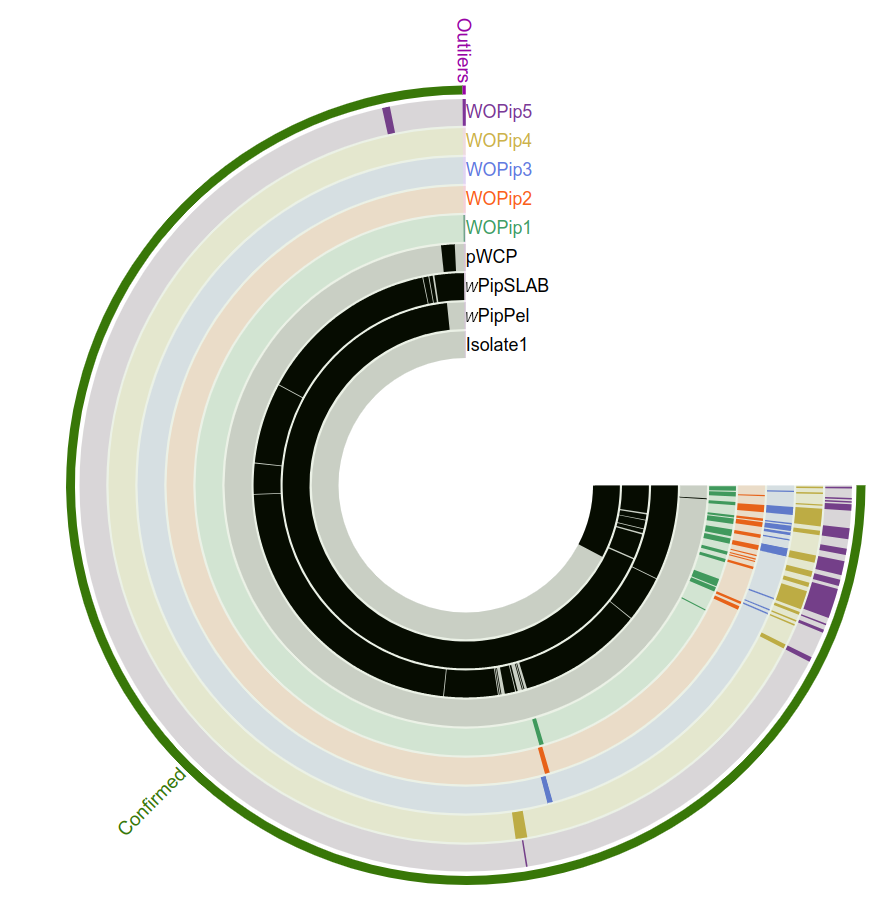
In the following steps we want to extract all GCs, detect where the *cif* genes are
located, and indicate single copy genes.
However, we need to remove two outlier GCs, that appear as two erroneous Prodigal
gene calls on WO FASTA files, given that WO are extracted from *w*PipPel and
should contain the same information.
We checked where those two GCs are located in *w*PipPel, and they are
located in intergenic regions, indicating that these are likely not
really genes.
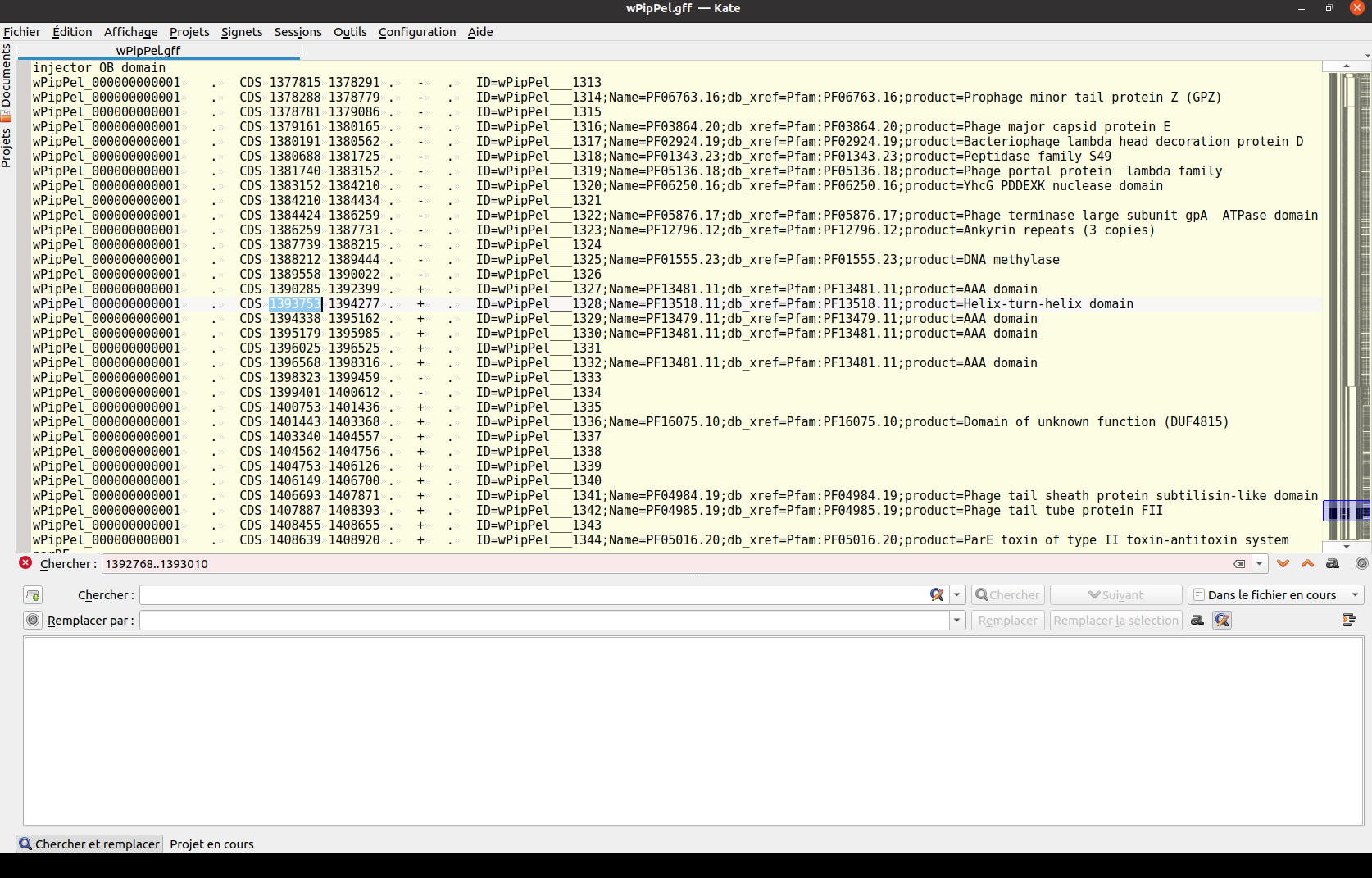
Note how the detected WO gene region in the search bar is between two
genes in wPipPel.gff and therefore intergenic.
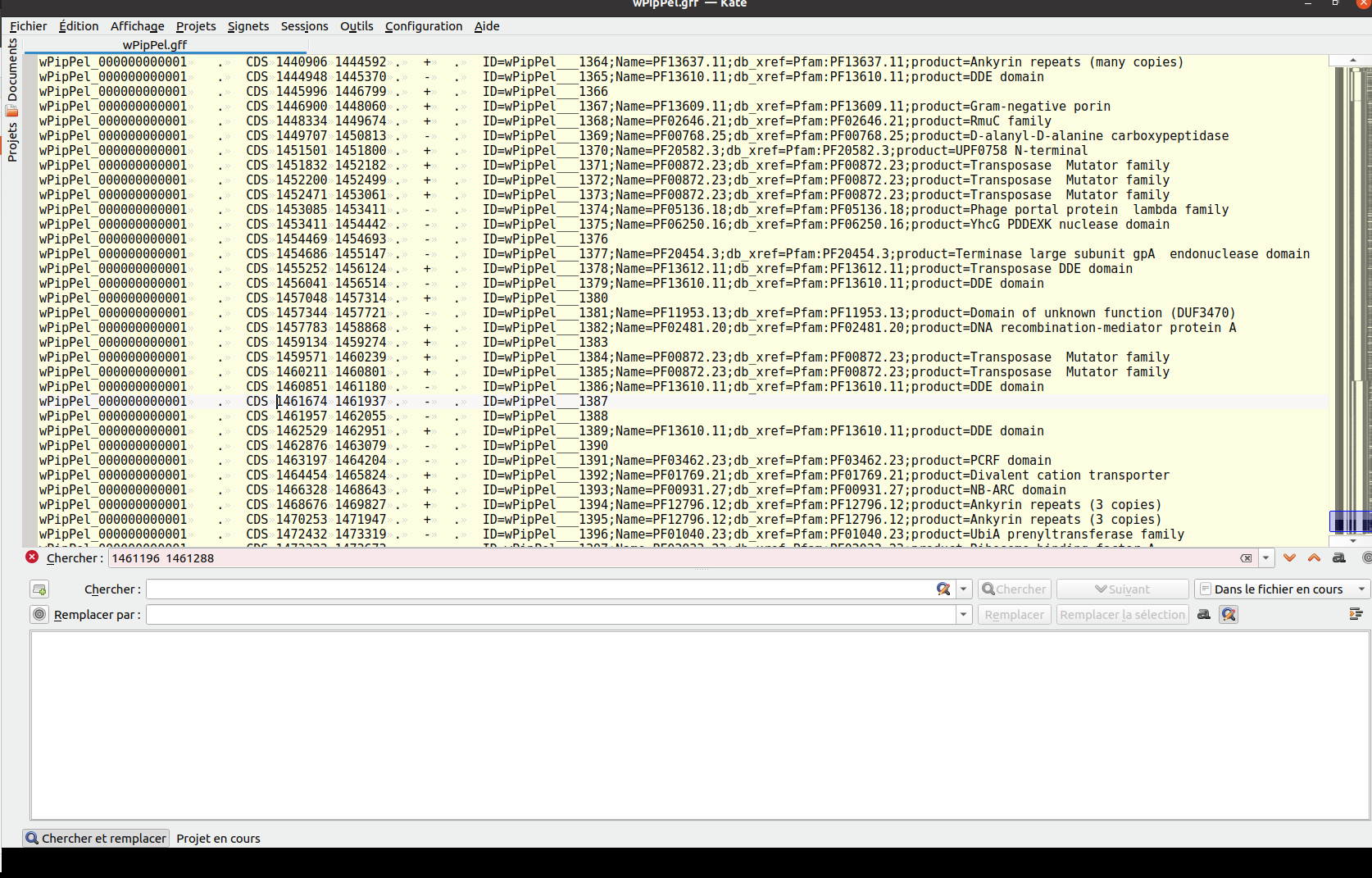
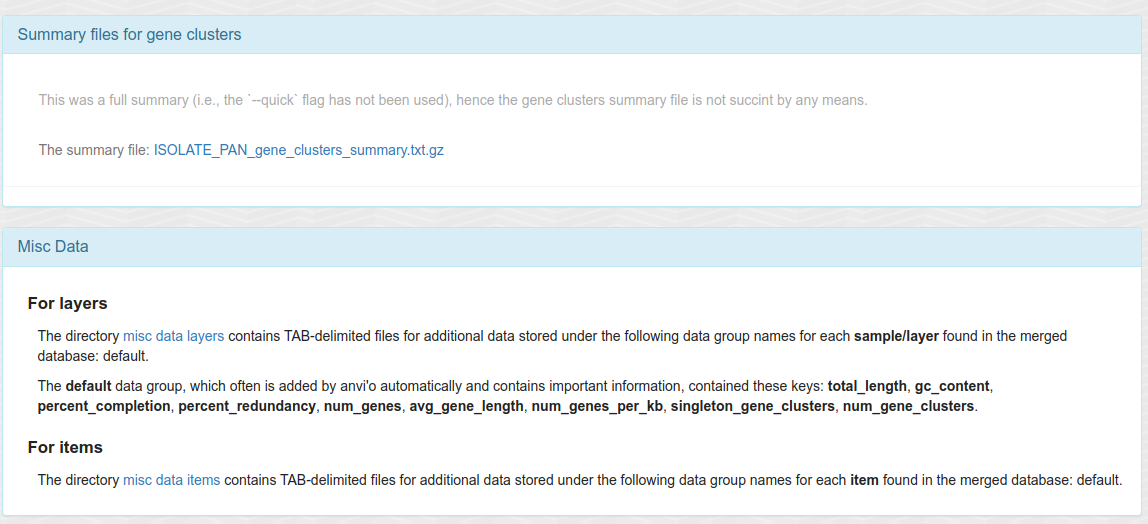
Having two bins (namely "Confirmed", "Outliers") allow us to make a summary of the
GCs (`ISOLATE_PAN_gene_clusters_summary.txt`), which we will use in the
[Notebook 4](SUPP_4_Get_gene_calls_WO_Isolate1.md) (Python) to extract gene information.
For the rest of the analyzes and
especially the main figures and main text, we will exclude the two
Outliers and work with 1141 GCs.
## Mapping SLAB and Isolate on SLAB assembly
As detaled in previous Notebooks, SLAB assembly does not contain *Culex* contigs as *Culex* reads were depleted.
``` bash
bowtie2-align-s --wrapper basic-0 --threads 4 -x ./SLAB002_Cxq_ov-contigs --passthrough -1 ./SLAB002_Cxq_ov-FILTERED_R1.fastq.gz -2 ./SLAB002_Cxq_ov-FILTERED_R2.fastq.gz > SLAB002_Cxq_ov.bam
```
``` bash
bowtie2-align-s --wrapper basic-0 --threads 4 -x ./SLAB002_Cxq_ov-contigs --passthrough -1 ./Isolate1-FILTERED_R1.fastq.gz -2 ./Isolate1-FILTERED_R2.fastq.gz > Isolate1_FILTERED.bam
```
Both short read pairs are aligned to SLAB002 assembly (from which we extract *w*PipSLAB) with bowtie.
## Preparing coverage for the pangenome
Coverage on *w*PipSLAB is calculated with `bedtools genomecov`.
``` bash
bedtools genomecov -d -ibam SLAB002_Cxq_ov.bam > Coverage_SLAB002_Cxq_ov.txt
```
``` bash
bedtools genomecov -d -ibam Isolate1_FILTERED.bam > Coverage_Isolate1-FILTERED.txt
```
Filter only contigs of SLAB002 that correspond to *Wolbachia* (*w*PipSLAB).
``` bash
grep ">" SLAB002_Cxq_ov/Wolbachia-contigs.fa | sed 's/^>//' > SLAB_Wolbachia_contigs.fa
```
Now get the coverage correspond to those contigs (reads mapping to *w*PipSLAB):
``` bash
grep -F -f SLAB_Wolbachia_contigs.fa Coverage_SLAB002_Cxq_ov.txt > Coverage_SLAB002_Cxq_ov_filtered.txt
```
``` bash
grep -F -f SLAB_Wolbachia_contigs.fa Coverage_Isolate1-FILTERED.txt > Coverage_Isolate1-FILTERED_filtered.txt
```
This gives us coverage files such as the following:
``` bash
head Data/Coverage_SLAB002_Cxq_ov_filtered.txt -n 12
```
## SLAB002_Cxq_ov_000000000871 1 65
## SLAB002_Cxq_ov_000000000871 2 91
## SLAB002_Cxq_ov_000000000871 3 100
## SLAB002_Cxq_ov_000000000871 4 100
## SLAB002_Cxq_ov_000000000871 5 102
## SLAB002_Cxq_ov_000000000871 6 102
## SLAB002_Cxq_ov_000000000871 7 102
## SLAB002_Cxq_ov_000000000871 8 103
## SLAB002_Cxq_ov_000000000871 9 105
## SLAB002_Cxq_ov_000000000871 10 112
## SLAB002_Cxq_ov_000000000871 11 134
## SLAB002_Cxq_ov_000000000871 12 138
``` bash
head Data/Coverage_Isolate1-FILTERED_filtered.txt -n 12
```
## SLAB002_Cxq_ov_000000000871 1 0
## SLAB002_Cxq_ov_000000000871 2 0
## SLAB002_Cxq_ov_000000000871 3 0
## SLAB002_Cxq_ov_000000000871 4 4
## SLAB002_Cxq_ov_000000000871 5 4
## SLAB002_Cxq_ov_000000000871 6 4
## SLAB002_Cxq_ov_000000000871 7 8
## SLAB002_Cxq_ov_000000000871 8 8
## SLAB002_Cxq_ov_000000000871 9 8
## SLAB002_Cxq_ov_000000000871 10 8
## SLAB002_Cxq_ov_000000000871 11 8
## SLAB002_Cxq_ov_000000000871 12 8
Download these files here:
[Coverage_SLAB002_Cxq_ov_filtered.txt](Data/Coverage_SLAB002_Cxq_ov_filtered.txt.gz)
and
[Coverage_Isolate1-FILTERED_filtered.txt](Data/Coverage_Isolate1-FILTERED_filtered.txt.gz).
## Anvio commands for preparing Python notebook analysis
### Export items data for getting number of genome hits in particular
``` bash
anvi-export-misc-data --target-data-table items -p ISOLATE_PAN/ISOLATE_PAN-PAN.db -o ISOLATE_PAN_ITEMS.tsv
```
This is useful in generating the layer of the pangenome for single copy
genes.
### Get the GFF of *w*PipSLAB for gene coverage calculation
``` bash
anvi-get-sequences-for-gene-calls -c ./wSLAB002o-contigs.db --export-gff -o wSLAB002o.gff --annotation-source Pfam
```
The GFF of SLAB contains prodigal gene calling IDs.
However, we will also need to associated those gene calling IDs with
their corresponding pangenome gene cluster IDs.
### Generate a FASTA of all gene clusters which header contains gene calling IDs
``` bash
anvi-get-sequences-for-gene-clusters -g ISOLATE-GENOMES.db -p ISOLATE_PAN/ISOLATE_PAN-PAN.db --report-DNA-sequences -o ISOLATE_PAN_GENE_CLUSTERS.fasta --max-num-genomes-gene-cluster-occurs 100 --max-num-genes-from-each-genome 100
```
Now we can go on with the Jupyter Python [Notebook 4](SUPP_4_Get_gene_calls_WO_Isolate1.md).
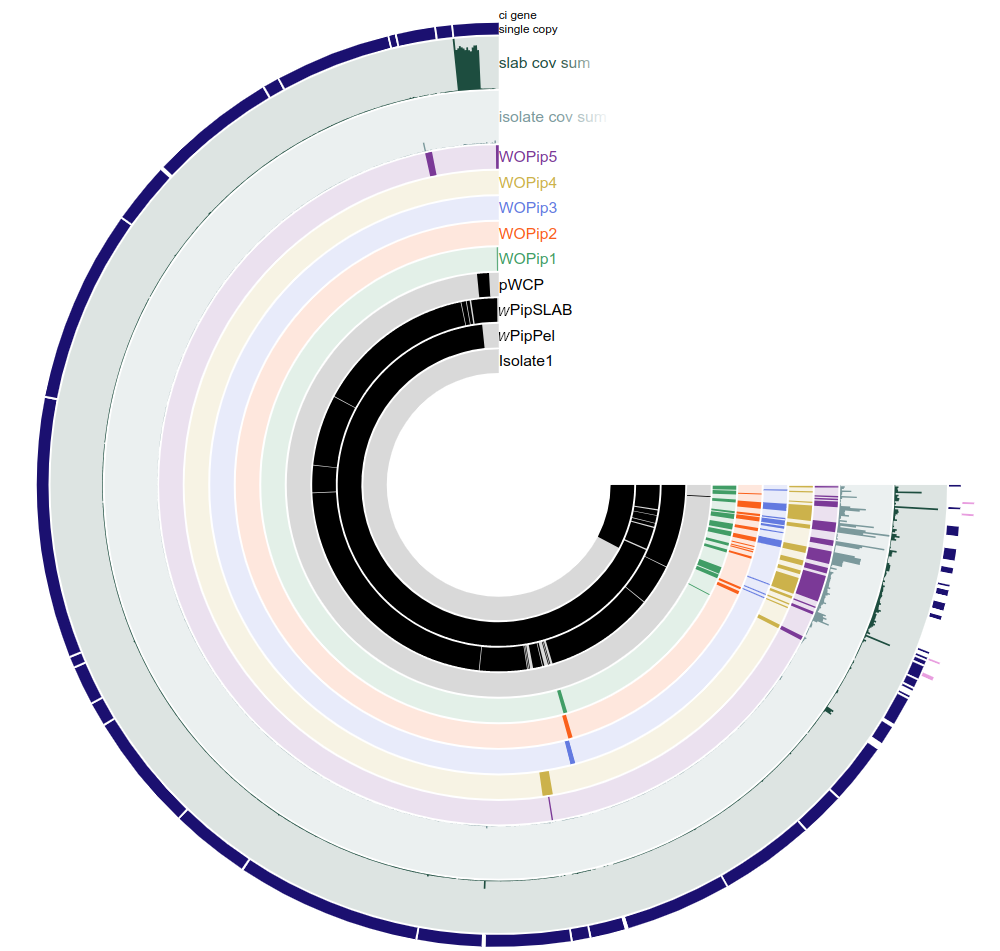
## Adding coverage to the pangenome
``` bash
anvi-import-misc-data --target-data-table items -p ISOLATE_PAN/ISOLATE_PAN-PAN.db ISOLATE_PAN_ITEMS_Isolate1_SLAB_against_SLAB.tsv
```
Using the file `ISOLATE_PAN_ITEMS_Isolate1_SLAB_against_SLAB.tsv`
generated by the [Notebook 4](SUPP_4_Get_gene_calls_WO_Isolate1.md).
## Splitting pangenome to remove outliers and display split pangenome
``` bash
anvi-split -p ISOLATE_PAN/ISOLATE_PAN-PAN.db -o ISOLATE_PAN/Confirmed -g ISOLATE-GENOMES.db -b Confirmed -C default
```
``` bash
anvi-display-pan -p ISOLATE_PAN/Confirmed/Confirmed/PAN.db -g ISOLATE-GENOMES.db -P 8080
```
## Or, if we want to simply show the full pangenome
``` bash
anvi-display-pan -p ISOLATE_PAN/ISOLATE_PAN-PAN.db -g ISOLATE-GENOMES.db -P 8080
```